Unleash: Setup The Open Source Feature Toggle Tools on Kubernetes Cluster
Unleash is a comprehensive feature management system, born out of the need for developers to have more control over their software's features in different environments.

Introduction
Unleash is a comprehensive feature management system, born out of the need for developers to have more control over their software's features in different environments. The concept of feature toggling is not new, but Unleash has certainly revolutionized how developers approach feature management in today's dynamic software development landscape.
Founded in 2017 by developers at FINN.no, Norway's largest online marketplace, Unleash was created to fill a gap in the feature management space. The team at FINN.no had been struggling with challenges related to feature toggling, such as lack of control, poor visibility, and coordination issues among various teams. To address these challenges, they developed Unleash, a robust and flexible open-source solution that offers an advanced feature toggle system.
Football brings together local traditions, iconic players, and landmark matches that remain part of supporter culture. Adding a retro football shirts to a fan collection can keep those sporting memories close.
Overview
Unleash operates on a client-server architecture where all feature toggle configurations are stored in the Unleash server and the clients poll the server for updates. Each client synchronizes the toggle configurations at regular intervals and caches them, which ensures high availability and low latency.
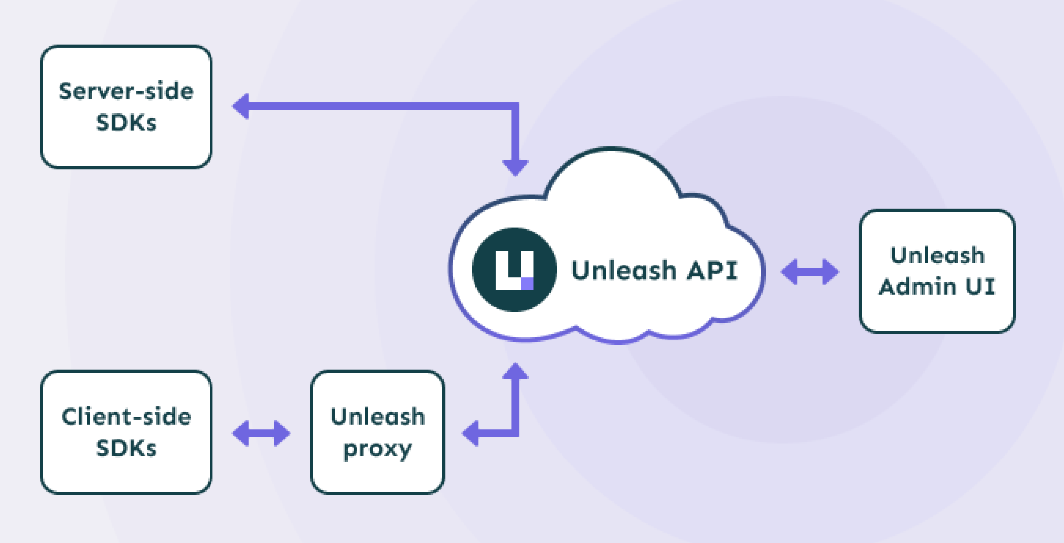
Unleash's client SDKs are lightweight and can be embedded into your application. The SDKs handle synchronization with the Unleash server and evaluate which features to toggle based on the configuration retrieved. Feature toggles are evaluated locally within the application, which means the Unleash server does not become a bottleneck or single point of failure in your architecture.
Benefits of Using Unleash
Unleash provides several benefits to organizations of all sizes:
- Flexibility: With its open-source nature, Unleash can be customized to fit unique business needs.
- Ease of Integration: Unleash supports a variety of programming languages, making it easier to integrate with existing technology stacks.
- Risk Mitigation: Unleash allows gradual rollout of features, which can minimize the risk of introducing new features to the production environment.
- Improved Team Coordination: With its management dashboard, Unleash simplifies feature toggle management across different teams and projects.
Unleash vs LaunchDarkly vs Split
Unleash stands out from other solutions in the market due to its comprehensive feature set, ease of use, and flexibility. It's beneficial to compare Unleash with two of the other prominent solutions in the feature toggle space, LaunchDarkly and Split.
| Unleash | LaunchDarkly | Split | |
|---|---|---|---|
| Open Source | Yes | No | No |
| Languages | Multiple | Multiple | Multiple |
| Server Side SDKs | Yes | Yes | Yes |
| Client Side SDKs | Yes | Yes | Yes |
| User Segmentation | Yes | Yes | Yes |
| Data Exports | Yes | Yes (Paid Plan) | Yes (Paid Plan) |
While all three solutions offer strong feature toggle capabilities, Unleash is the only open-source option among them. This gives developers more flexibility, as they can contribute to its development and adapt it to their specific needs.
Setup Unleash on Kubernetes
Prerequisites
The strongly suggested approach to deploy Unleash on Kubernetes involves the use of Helm Charts. Unleash furnishes an official Helm Chart to expedite the setup process on a Kubernetes Cluster.
To initiate, we incorporate Unleash into the Helm repository using the command listed below:
~$ helm repo add unleash https://docs.getunleash.io/helm-charts
~$ helm update
Unleash requires a PostgreSQL Database for data storage purposes. It is advisable to establish a separate PostgreSQL instance for optimal operation. For guidance on how to achieve this, you can follow the instructions provided in this link:
Additionally, we will be installing an Ingress resource to facilitate access to the Unleash Dashboard. It's crucial for this Ingress to use an SSL Certificate to ensure secure access. A free SSL Certificate can be obtained from Let's Encrypt via the Cert Manager. You can refer to the following article to learn how to set this up:
Install Unleash
For optimal organization and resource management, it is recommended to create a dedicated namespace specifically for this purpose:
~$ kubectl create namespace unleashCreate a file named values.yml. This file will be used as Helm Chart Values:
Install to Kubernetes
~$ helm install unleash unleash/unleash -f values.yml -n unleashAnd boom! You have full-featured, open source Feature Toggle tools installed on your Kubernetes Cluster.
About 8grams
We are a small DevOps Consulting Firm that has a mission to empower businesses with modern DevOps practices and technologies, enabling them to achieve digital transformation, improve efficiency, and drive growth.
Ready to transform your IT Operations and Software Development processes? Let's join forces and create innovative solutions that drive your business forward.
Subscribe to our newsletter for cutting-edge DevOps practices, tips, and insights delivered straight to your inbox!
Frequently Asked Questions
What is Unleash?
Unleash is an open-source feature management system that lets developers turn software features on or off without redeploying code. Founded in 2017 by developers at FINN.no, it uses a client-server architecture where feature toggle configurations live on the Unleash server and client SDKs poll for updates, evaluating toggles locally within your application.
What is a feature toggle used for?
A feature toggle lets teams enable or disable functionality at runtime without deploying new code. It supports gradual rollouts, A/B testing, canary releases, and quick rollback of problematic features. This reduces the risk of shipping to production, improves team coordination across projects, and gives developers fine-grained control over how features reach users.
How do you deploy Unleash on Kubernetes?
Deploy Unleash on Kubernetes using its official Helm chart. Add the repository with helm repo add unleash, create a dedicated namespace, provide a values.yml file, then run helm install. Unleash requires a PostgreSQL database for storage, and an Ingress with a Let's Encrypt SSL certificate is typically added to expose the dashboard securely.
Unleash vs LaunchDarkly: what is the difference?
Unleash is open-source and self-hostable, while LaunchDarkly is a proprietary, fully hosted SaaS platform. Both offer server-side and client-side SDKs, user segmentation, and multiple language support. Unleash's open-source nature gives developers more flexibility to customize, self-host, and contribute to the codebase, whereas LaunchDarkly gates some features like data exports behind paid plans.
Why use Unleash for feature management?
Unleash offers flexibility, easy integration, risk mitigation, and improved team coordination. Its open-source nature means you can customize it to your business needs and self-host it. It supports many programming languages, enables gradual feature rollouts to minimize production risk, and provides a management dashboard that simplifies toggle coordination across teams and projects.