Laravel: How to setup The Most Popular PHP Framework Application on Kubernetes Cluster
Establishing a Laravel application on a Kubernetes cluster can be quite challenging, intricate, and not as direct as one might hope


Introduction
Our experience with setting up Laravel on Kubernetes has not been pleasant, even though Laravel is one of the most popular PHP frameworks available. Establishing a Laravel application on a Kubernetes cluster can be quite challenging, intricate, and not as direct as one might hope. This is somewhat expected, given that PHP was not developed during the Cloud Native era, so we need to make some adjustments to ensure it runs smoothly on Kubernetes. In this article, we will explore how to containerize a PHP application, specifically a Laravel application, and then how to deploy it to a Kubernetes cluster.
Prerequisites
Assuming you have an application with the following specifications:
- Laravel Application
- Domain: https://example.com
- Utilizes Redis as a Queue Driver, requiring two Pods for deployment: one for handling HTTP requests and another for the Queue Worker, both sharing the same configuration
- MySQL as the database
- Implements the HTTPS protocol
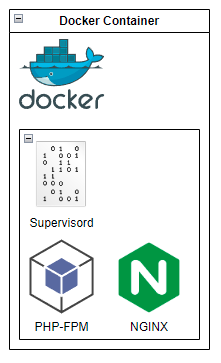
- Laravel Application running inside a Docker Container
- PHP executing on top of php-fpm, with Nginx serving as a Reverse Proxy to manage HTTP requests and redirect them to php-fpm
- Supervisord employed as the service controller for Nginx and php-fpm
You can download all the source code for this example from the following link: https://github.com/8grams/laravel-kubenetes-example
Let's get started!
Create Laravel Application
You have the option to download the example Laravel Application from https://github.com/8grams/laravel-kubenetes-example or to create one from scratch.
~$ composer create-project laravel/laravel:^9.0 laravel-appThe next step involves creating a Dockerfile. This Dockerfile will include the installation of numerous PHP-related libraries, which should be sufficient for most use cases.
Setup Webserver
The Dockerfile mentioned above ensures that our Laravel App runs on port 8000. The subsequent step involves setting up Nginx to receive HTTP requests on port 8000 and forward them to php-fpm on port 9000.
Lastly, we can create a supervisord configuration that manages both Nginx and php-fpm processes effectively.
Installing Database, Redis, and SSL Certificate
You have the option to utilize an external Database and Redis or install them on the Kubernetes Cluster. We will cover the latter in the following in-depth technical guides:
Additionally, you will need Cert Manager to generate a free SSL Certificate, enabling your application to run using the HTTPS protocol. You can learn how to accomplish this in the guide provided below:
Prepare Deployment
We will create two Deployment Manifests: one for the web application and another for the Queue Worker. Both deployments will utilize a single environment configuration, which can be represented using the ConfigMap resource below:
Install it to Kubernetes
~$ kubectl apply -f configmap.ymlCreate a deployment for web application
~$ kubectl apply -f deployment.ymlCreate another one for Queue Worker
~$ kubectl apply -f deployment.ymlNow, we can create Service for it
~$ kubectl apply -f service.ymlThe last one for Kubernetes installation is creating Ingress resource
~$ kubectl apply -f ingress.ymlUsing HTTPS
When running an application in a container, Laravel might still use HTTP instead of HTTPS. It appears that the request protocol detector does not work correctly in this scenario. As a result, we need to programmatically force Laravel to rewrite the base_url variable to use HTTPS.
To achieve this, open the pp/Providers/AppServiceProvider.php file and add the following code snippet within the boot function:
public function boot()
{
    if(!$this->app->environment('local')) {
        \URL::forceScheme('https');
    }
}
Great! You have now successfully set up your Laravel Application to run on a Kubernetes Cluster!
About 8grams
We are a small DevOps Consulting Firm that has a mission to empower businesses with modern DevOps practices and technologies, enabling them to achieve digital transformation, improve efficiency, and drive growth.
Ready to transform your IT Operations and Software Development processes? Let's join forces and create innovative solutions that drive your business forward.
Subscribe to our newsletter for cutting-edge DevOps practices, tips, and insights delivered straight to your inbox!
Frequently Asked Questions
What is Laravel?
Laravel is one of the most popular open-source PHP web application frameworks. It provides an expressive syntax and built-in tools for routing, database access, queues, and authentication, helping developers build web applications quickly. Laravel applications commonly use MySQL for storage and Redis as a queue driver for background job processing.
How do you deploy a Laravel application on Kubernetes?
Deploy Laravel on Kubernetes by containerizing it in a Docker image, then applying Kubernetes manifests. Use PHP running on php-fpm with Nginx as a reverse proxy, managed by Supervisord. Create a ConfigMap for environment variables, two Deployments (one for HTTP requests and one for the queue worker), a Service, and an Ingress with SSL.
Why is running Laravel on Kubernetes challenging?
Running Laravel on Kubernetes is challenging because PHP predates the cloud-native era and was not designed for containerized orchestration. You must combine php-fpm, Nginx as a reverse proxy, and Supervisord into a single container image, separate the web and queue-worker workloads into distinct pods, and handle configuration and HTTPS behavior that containers do not manage automatically.
How do you force Laravel to use HTTPS behind a reverse proxy?
Force Laravel to use HTTPS by calling URL::forceScheme('https') inside the boot method of app/Providers/AppServiceProvider.php. When running in a container behind a reverse proxy, Laravel's protocol detector may incorrectly generate HTTP URLs, so you rewrite the base URL scheme programmatically, typically only outside the local environment.
Why use php-fpm with Nginx for a Laravel container?
php-fpm with Nginx is a common way to serve PHP applications like Laravel efficiently. Nginx acts as a reverse proxy handling incoming HTTP requests and forwarding them to php-fpm, which executes the PHP code on a separate port. Supervisord manages both processes within the container, keeping Nginx and php-fpm running reliably together.
Club heritage and international football give every shirt its own connection to a place, era, and group of supporters. Selecting a football jersey can be a natural way to represent an enduring love of the game.