How to do Database Migration, the right way
Database migrations are a crucial aspect of modern software development, particularly when working with relational databases. This article aims to provide an overview of database migrations, their benefits, how popular frameworks and libraries handle them, and how we do it.


Introduction
Database migrations are a crucial aspect of modern software development, particularly when working with relational databases. This article aims to provide an overview of database migrations, their benefits, how popular frameworks and libraries handle them, and how we do it.
What is Database migration?
In this article, Database migration refers to the process of changing data, schema, or other components. This can include changes to tables, columns, indexes, constraints, and other database objects. Database migrations are often needed when evolving an application's data model.
Versioning is the practice of assigning unique version numbers to different states of a system, making it easier to track and manage changes. In the context of database migrations, versioning plays a critical role in maintaining a chronological order of schema changes, ensuring that they are applied consistently across different environments. By keeping track of these versions, developers can easily apply or rollback changes, making it easier to adapt to evolving requirements and fix issues that may arise during the migration process.
Why developers should use DB migration?
There are several benefits to using database migrations in software development:
- Consistency: DB migrations help maintain a consistent schema across development, testing, and production environments. This prevents potential issues that could arise from discrepancies between environments.
- Collaboration: Migrations facilitate better collaboration among team members by providing a clear history of schema changes. This makes it easier for team members to understand the current state of the database and how it has evolved over time.
- Version control: DB migrations enable developers to use version control systems to track and manage schema changes, making it easier to revert to a previous version or identify the cause of any issues.
Various frameworks and libraries offer tools and features to help developers manage database migrations. Some popular examples include:
- Django (Python): Django's built-in migration framework automatically generates migration files based on changes to the data model. Developers can then use Django management commands to apply or roll back migrations as needed.
- Ruby on Rails (Ruby): Rails includes a powerful migration system called ActiveRecord Migrations. Developers can create migration files using Rails generators, and the framework will automatically manage the migration process, including versioning and rollback capabilities.
- Laravel (PHP): Laravel's migration system, called Eloquent, allows developers to create migration files that describe schema changes. Laravel's Artisan command-line tool can then be used to apply, roll back, or view the status of migrations.
- Sequelize (JavaScript): Sequelize is an Object-Relational Mapping (ORM) library for Node.js that includes a migration system. Developers can create migration files using Sequelize's CLI tool, which also provides commands for managing migrations, such as applying, rolling back, and checking the migration status.
Our Experience with Database Migration in Production
Our journey with database migrations in production has been an enlightening one, particularly when working with applications running on Kubernetes clusters. Kubernetes has transformed the way applications are deployed and managed, but it has also presented some unique challenges when it comes to handling database migrations.
One of the primary concerns we encountered was the need to enter the pod shell and manually execute the migration command. This approach was not only inconvenient but also introduced several risks. For example, what would happen if the pod were to be accidentally destroyed while the migration was in progress? Additionally, allowing developers direct access to the pod raised security concerns, as it could potentially lead to unauthorized access or accidental damage to the production environment.
To address these challenges, we sought a more streamlined and secure approach to conducting database migrations on Kubernetes. We began by researching best practices and ultimately discovering a strategy that could be employed to overcome the obstacles we faced.
Introducing Bytebase
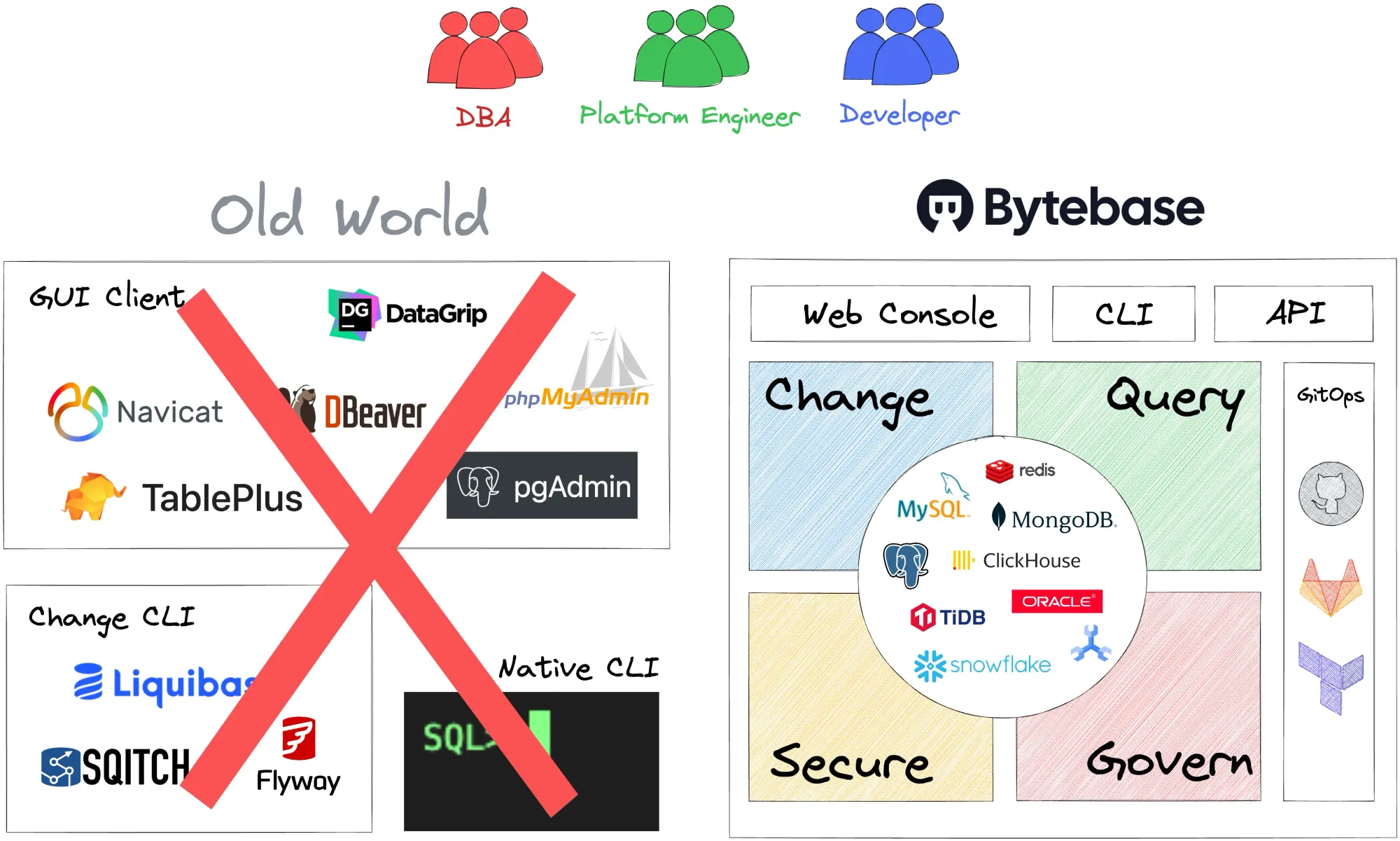
Bytebase is a centralized platform designed to manage databases, supporting popular relational database management systems such as PostgreSQL, MySQL, and MariaDB. As an open-source, developer-friendly, and easy-to-use solution, Bytebase has quickly become an invaluable tool for teams working on database migrations.
Bytebase fits perfectly into our GitOps workflow. This allows development teams to collaborate on database migrations within the familiar context of code repositories. Developers can submit pull requests, review proposed changes, and approve them. Once approved, Bytebase handles the rest, applying the schema changes to the database with ease.
By incorporating Bytebase into our database management strategy, we have been able to address many of the challenges previously associated with database migrations on Kubernetes. By automating the migration process and providing a centralized platform for collaboration, Bytebase has made it possible for our development teams to work together more effectively and efficiently.
Overall, Bytebase has proven to be an invaluable resource for managing database migrations, offering a wealth of features that make the process more streamlined, secure, and reliable. With Bytebase, we can confidently undertake migrations in our production environment, knowing that we have implemented best practices to minimize risks and ensure the smooth operation of our applications.
Go check it now and you will not turn away from it!
About 8grams
We are a small DevOps Consulting Firm that has a mission to empower businesses with modern DevOps practices and technologies, enabling them to achieve digital transformation, improve efficiency, and drive growth.
Ready to transform your IT Operations and Software Development processes? Let's join forces and create innovative solutions that drive your business forward.
Subscribe to our newsletter for cutting-edge DevOps practices, tips, and insights delivered straight to your inbox!
Frequently Asked Questions
What is a database migration?
A database migration is the process of changing a database's schema, data, or other components, such as tables, columns, indexes, and constraints. Migrations are commonly needed when evolving an application's data model over time. They usually rely on versioning, which assigns version numbers to each schema state so changes can be applied consistently or rolled back.
Why should developers use database migrations?
Developers should use database migrations because they keep the schema consistent across development, testing, and production environments, preventing errors from environment discrepancies. Migrations also improve collaboration by providing a clear history of schema changes, and they integrate with version control so teams can track changes, revert to previous versions, and pinpoint the cause of issues.
Which frameworks provide built-in database migration tools?
Many popular frameworks include built-in migration tools. Django (Python) auto-generates migration files from data model changes, Ruby on Rails uses ActiveRecord Migrations, Laravel (PHP) offers migrations run through its Artisan CLI, and Sequelize provides a migration system for Node.js via its CLI. Each supports applying, rolling back, and checking the status of migrations.
What challenges do database migrations face on Kubernetes?
On Kubernetes, a common challenge is having to enter a pod's shell to manually run migration commands, which is inconvenient and risky. If the pod is destroyed mid-migration, the process can be left in an inconsistent state, and giving developers direct pod access raises security concerns like unauthorized access or accidental damage to production. A more automated, secure approach is preferred.
What is Bytebase?
Bytebase is an open-source, centralized platform for managing database changes, supporting relational databases like PostgreSQL, MySQL, and MariaDB. It fits into a GitOps workflow, letting teams propose schema changes through pull requests, review and approve them, and then have Bytebase apply the changes automatically. This makes migrations more streamlined, secure, and reliable, especially on Kubernetes.
Club heritage and international football give every shirt its own connection to a place, era, and group of supporters. Selecting a football jersey can be a natural way to represent an enduring love of the game.