ArgoCD: GitOps Made Easy - Part 2
Setting up ArgoCD on a Kubernetes cluster is relatively simple. ArgoCD conveniently offers deployment manifests, enabling a quick and efficient installation process on your Kubernetes cluster.

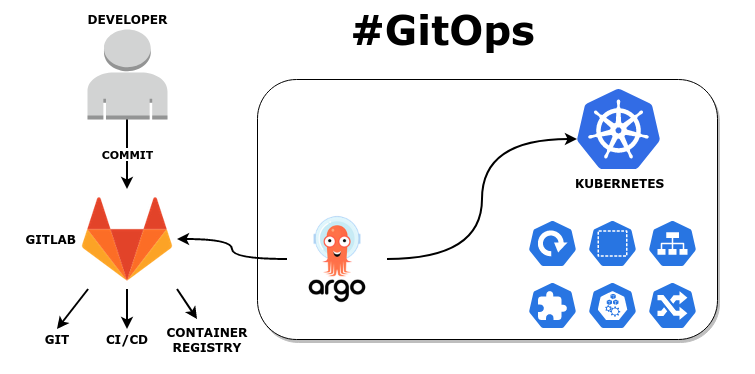
Introduction to ArgoCD
As Kubernetes continues to gain traction as a leading container orchestration platform, the need for efficient and reliable deployment and management tools grows. ArgoCD has emerged as a powerful solution, leveraging GitOps principles to optimize Kubernetes deployments.
What is ArgoCD?
ArgoCD is an open-source, declarative, GitOps-based continuous delivery tool specifically designed for Kubernetes. It allows developers and operations teams to streamline deployment and management processes by automating the synchronization of desired application states, as defined in a Git repository, with the actual states within a Kubernetes environment.
Key Features
ArgoCD offers a range of features that streamline the deployment and management of Kubernetes resources. It maintains declarative and version-controlled configurations by storing all Kubernetes resource configurations in a Git repository. This setup ensures consistency and version control. Furthermore, ArgoCD automatically detects and deploys changes as they are committed to the Git repository, enabling continuous delivery.
Real-time visibility into the health and status of applications within the Kubernetes cluster is another essential feature of ArgoCD. In addition, ArgoCD allows for easy rollbacks to previous configurations and maintains a detailed history of application changes. Finally, ArgoCD offers fine-grained access control and supports multi-tenancy, enabling multiple teams to manage their applications independently.
Why we need tools like ArgoCD
Using ArgoCD offers several advantages for organizations embracing Kubernetes:
- Improved collaboration: ArgoCD's Git-centric approach encourages collaboration between development and operations teams.
- Enhanced consistency: By maintaining version-controlled configurations, ArgoCD ensures application consistency across different environments.
- Increased efficiency: ArgoCD automates deployment and management processes, reducing manual intervention and the potential for human error.
- Faster deployment cycles: ArgoCD accelerates application deployment by automatically detecting and deploying changes as they are committed.
- Greater visibility: ArgoCD's monitoring capabilities provide real-time insights into application health and status.
Installing ArgoCD on Kubernetes Cluster
Setting up ArgoCD on a Kubernetes cluster is relatively simple. ArgoCD conveniently offers deployment manifests, enabling a quick and efficient installation process on your Kubernetes cluster.
Download Deployment Manifest
~$ wget https://raw.githubusercontent.com/argoproj/argo-cd/stable/manifests/install.yamlCreate dedicated namespace argocd and install ArgoCD on that namespace
~$ kubectl create namespacce argocd

~$ kubectl -n argocd apply -f install.yaml
Verify installation
~$ kubectl -n argocd get pods
NAME                                           READY
argocd-application-controller-0        1/1     Running
argocd-applicationset-controller-xxx   1/1     Running
argocd-dex-server-xxx                  1/1     Running
argocd-notifications-controller-xxx    1/1     Running
argocd-redis-xxx                       1/1     Running
argocd-repo-server-xxx                 1/1     Running
argocd-server-xxx                      1/1     Running
At present, ArgoCD has been successfully installed on our Kubernetes cluster.
Exposing ArgoCD service
To enhance accessibility, we can expose the ArgoCD service through Ingress, allowing us to access it via a browser without the need for private tunneling. We will create an SSL Certificate using Let's Encrypt for our ArgoCD Ingress.
To learn how to accomplish this, you can refer to the following article:
Next, we will create Ingress resources
It is crucial to remember not to modify the tls.secretName value, as ArgoCD already has a reference to it.
Install to Kubernetes Cluster
~$ kubectl -n argocd apply -f ingress.yamlNow you can open your browser and navigate to https://argocd.example.com and you will see ArgoCD's login page there
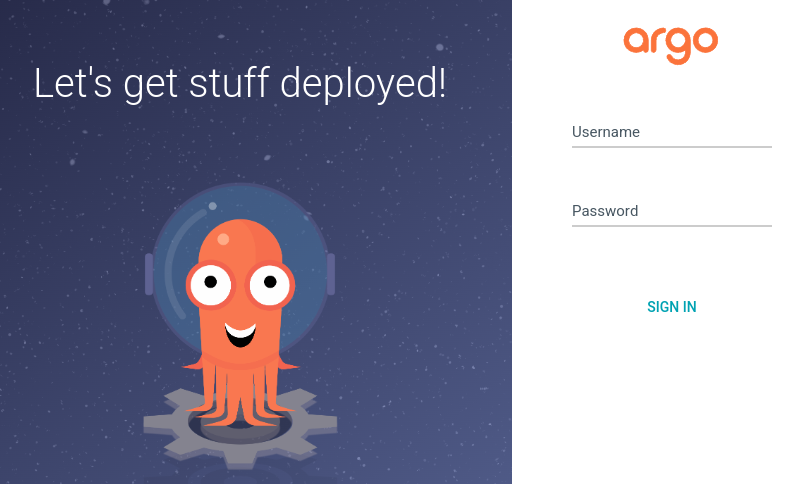
By default, the username is admin. To obtain the admin password, you can access it from ArgoCD's secret.
~$ kubectl -n argocd get secret argocd-initial-admin-secret -o jsonpath="{.data.password}" | base64 -dConfiguring Git Repository on ArgoCD
The first thing we need to do after installing ArgoCD is configuring git repository. Git workflows form the core of your GitOps deployments, as they enable the implementation of changes in your environment. With GitOps, Git serves as both the source of truth and the interface for your environment.
Here are some best practices of managing git repository for our GitOps Deployments:
- Separate your repositories: Keep application code and YAML configurations in distinct repositories. This separation prevents configuration changes from triggering unnecessary application rebuilds and allows for independent lifecycles of code and configuration.
- Separate development in directories, not branches: Store configurations for different environments (e.g., test, production) in separate directories instead of branches. This approach avoids challenges related to merging environment-specific configurations.
- Trunk-based development: Use trunk-based development for your configuration repositories. This approach involves a single "trunk" branch and short-lived branches for each environment. Once an environment's development is complete, create a pull request to merge the branch into the trunk.
- Pay attention to policies and security: To maintain a stable environment and protect the trunk, utilize version control features for policy management and security. Set up branch protection rules and establish clear rules for merging and approvals.
By following these best practices, you can effectively manage Git workflows for your GitOps deployments, ensuring a streamlined and secure process.
So let's start. Login to ArgoCD Dashboard and navigate to Settings > Repositories > Connect Repo. Fill the form like screenshot below (adjust with your own values) and klik Connect.
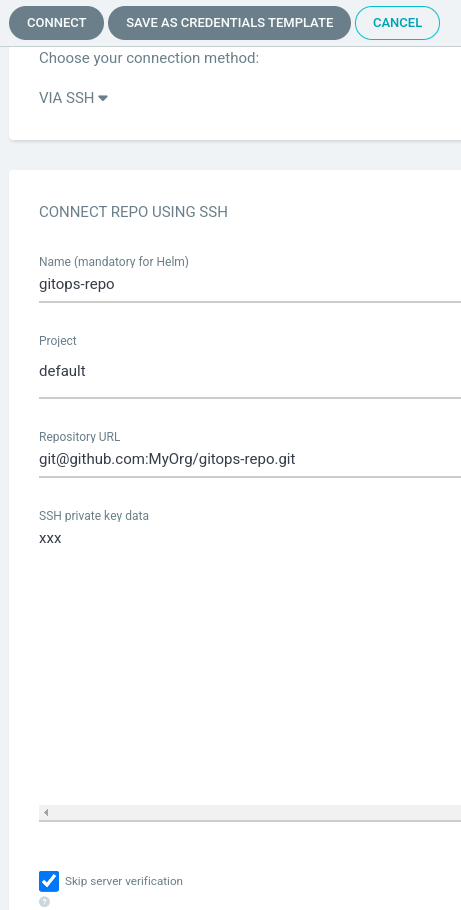
Great! ArgoCD is now set up and prepared for use. You can begin configuring your Kubernetes resources within ArgoCD.
About 8grams
We are a small DevOps Consulting Firm that has a mission to empower businesses with modern DevOps practices and technologies, enabling them to achieve digital transformation, improve efficiency, and drive growth.
Ready to transform your IT Operations and Software Development processes? Let's join forces and create innovative solutions that drive your business forward.
Subscribe to our newsletter for cutting-edge DevOps practices, tips, and insights delivered straight to your inbox!
Frequently Asked Questions
What is GitOps?
GitOps is an approach to managing infrastructure and applications where a Git repository holds the declarative definition of the whole system and automated tooling keeps the running environment in sync with it. You make changes by committing to Git rather than acting on the system directly.
When was GitOps introduced?
The term GitOps was coined by Weaveworks in 2017, building on continuous integration, continuous delivery, and continuous deployment (CI/CD) by applying the same version control and automation discipline to infrastructure.
How does GitOps work?
All configuration is consolidated and tracked in a Git repository, and direct changes to the running system are disallowed. A GitOps tool continuously scans the repository and automatically applies any new configuration, so the running infrastructure always matches the state defined in Git.
What are the four core principles of GitOps?
They are declarative infrastructure and applications, version control with Git, automated synchronization and convergence to the declared state, and immutable infrastructure paired with observability. Together they keep the system consistent, transparent, and auditable.
What are the benefits of GitOps?
GitOps improves collaboration through version control and history, enhances security with access control and signed commits, increases reliability by reducing human error, and enables faster recovery through easy rollbacks to a known-good state.
What is the difference between GitOps and Infrastructure as Code?
Infrastructure as Code defines infrastructure in machine-readable files. GitOps adds a workflow on top of that: it makes a Git repository the single source of truth and uses an automated tool to continuously sync the running system to the repo, correcting any drift automatically.
What is ArgoCD?
ArgoCD is an open-source, declarative, GitOps-based continuous delivery tool built for Kubernetes. It automatically synchronizes the desired application state defined in a Git repository with the actual state running in a Kubernetes cluster.
Is ArgoCD only for Kubernetes?
Yes. ArgoCD is designed specifically for Kubernetes and manages Kubernetes resources. It keeps their configurations version-controlled in Git and continuously reconciles the cluster to match.
What is the difference between ArgoCD and FluxCD?
Both are open-source GitOps continuous delivery tools that sync a Kubernetes cluster to a Git repository. ArgoCD is application-centric and ships with a rich web UI, while FluxCD is a lightweight, controller-based toolkit that favours a more composable, CLI-driven approach.
How should you structure Git repositories for GitOps?
Keep application code and configuration in separate repositories, separate environments by directories rather than branches, use trunk-based development for configuration, and protect the trunk with branch protection rules and clear approval policies.
Football fans often treat kit design as part of the story around a team because personalised names and numbers add another layer of memory to a kit. Collectors interested in Rangers often look at how different seasons changed the shape and details of the shirt. When a shirt is chosen for a gift or collection, AC Milan football shirts remains one way to link football history with the practical choice of a shirt. Across different eras, the collection angle remains tied to football memories.